Agents can use computers in a more native way if we allow them to reverse engineer the software they use. Given a program's compiled binaries and a reverse-engineering toolkit, a language agent can inspect the program to understand how it works, rewire it for its own use, and build an MCP server on top of it. This allows the agent to complete tasks without reading the screen. Our experiments with FreeCAD, where only the compiled binary is provided, show that this approach lets the agent complete a task 55× faster using 35× fewer tokens. In a real-time Fruit Ninja task, the agent can achieve expert-level scores, while vision-based computer-use agents struggle to make meaningful moves.
Computer use lets a language agent operate any program the way a person does, through screenshots and the mouse, but every step costs a new screenshot and a new model reply. But the screen may not be the most efficient interface for an agent. Earlier studies found that agents could perform better when they are given tools to call, such as an MCP server, in addition to screenshots (Song et al., 2024; Jia et al., 2025). In these studies, people design the tools and hand them to the agent, and the software itself stays unchanged throughout.
We show that an agent can build these tools itself if it is allowed to reverse engineer the program. We give it only the compiled binaries and REA, a reverse-engineering toolkit that inspects binaries and instruments running processes, with no source code, documentation or internet access. The agent inspects the program to understand how it works, finds a way into the running process, and builds an MCP server on top of it. It then does its tasks through this server alone, without the screen, mouse or keyboard. This is a more native way for an agent to use a program: it reads the program's state and calls its functions directly, where computer use goes through an interface that was drawn for human eyes. We call this agent-native computer use.
The MCP servers that the agents built and the builders that produced them are available at github.com/MIT-MI/Agent-Native-Computer-Use-Code.
How an agent builds an MCP server from binaries
One agent session gets the binaries and REA in an offline sandbox and is asked to build an MCP server. It never sees the benchmark tasks, so it has to decide by itself which operations the server should offer. The build has four steps (Figure 1):
- Analyze. The agent inspects the package and finds what the binaries expose, for example functions that code inside the process could call.
- Test. The agent runs the program and tries its guesses on the running process. For FreeCAD, it injects code with Frida and calls the program's functions to see what they do.
- Build. The agent writes the MCP server. For FreeCAD, this includes the script that the server injects into the program.
- Check. The agent runs the server against the program. A bug in the code sends it back to step 3, and a new question about the program sends it back to step 2.
Each tool does one whole operation. In the FreeCAD server, cutting a vent into the lid is a single call, freecad_part_boolean(operation=cut, base=Vented1, tool=Vent2, name=Vented2, document=sensor_lid). It reads the way a CAD user would describe the step, subtracting Vent2 from the lid and naming the result Vented2, even though the tool was not made for this task. The agent built the server before it saw any task, and the same tool can cut, fuse or intersect any two objects. With computer use, the same model spent 40 minutes in FreeCAD's menus and dialogs and did not cut any vent. Appendix A shows how the agent spent its time and what it did during one build.
A build changes both the harness and the environment
Work on computer use usually changes only the harness. The agent gets better ways to look at the screen and to click, and the program stays as it is. A build in our setting changes both sides (Figure 2). The harness gets an MCP server. The running FreeCAD gets a script, injected with Frida, that receives each tool call and calls the matching FreeCAD functions. The agent wrote both halves, and a tool call works only when both are in place. Appendix B describes the tools of both servers.
Results on FreeCAD
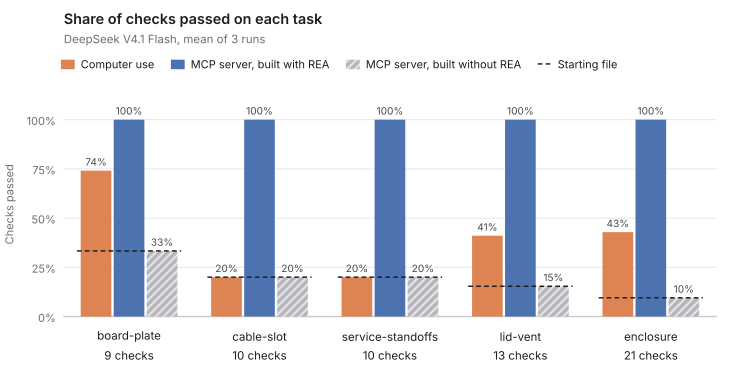
For our main experiments, we evaluate the agent on five FreeCAD tasks (Table 1) using the MCP server it built. Each task starts from a partially completed project file and is graded by checks on the output files the agent saves. The starting files pass only 10%–33% of these checks, leaving most of the work to the agent. Using its server, the agent completed all five tasks with substantially less time and fewer tokens than the computer-use baseline. The server is built before the agent sees any evaluation task and cannot be modified during evaluation.
| Task | What the agent must do | Checks | Deadline |
|---|---|---|---|
| board-plate | Resize a mounting plate and move its two holes, keeping the linked cuts. Save, then export STEP and STL. | 9 | 20 min |
| cable-slot | The same edit plus a slot cut through the plate. | 10 | 20 min |
| service-standoffs | The same edit plus four standoffs fused on in a chain. | 10 | 20 min |
| lid-vent | Resize a lid, move four screw holes and cut five vents in sequence. | 13 | 40 min |
| enclosure | Release a two-part enclosure. Shell, posts, port cutouts, lid holes, vents and a rotated label plate add up to 26 linked features. | 21 | 90 min |
The MCP server compared with computer use
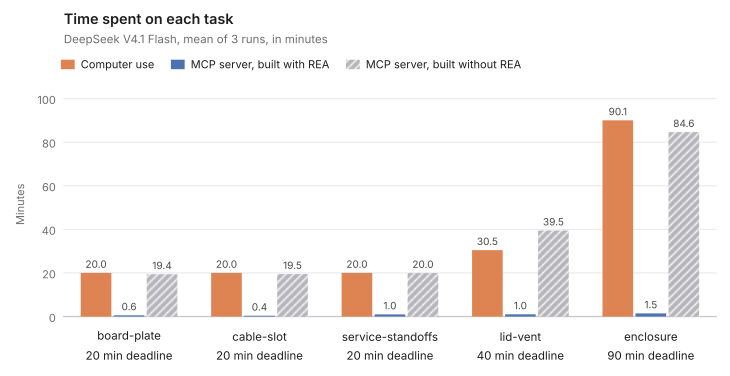
We use DeepSeek V4.1 Flash for both the builds and the tasks, and run each task three times per setup. With its MCP server, the model passed every check on every task, whereas with computer use it passed 40% on average: it reached 74% on the shortest task, and on cable-slot and service-standoffs it passed nothing beyond what the starting file already passes (Figure 3). The MCP runs were also far cheaper. Together, the five tasks took 4.5 minutes and 3.1M tokens with the server, against 180.6 minutes and 127.1M tokens with computer use, which is about 40× less of each (Figure 4). On lid-vent, the task shown in Demo 1, the MCP run finished 55× faster using 35× fewer tokens, in 44 seconds and 0.64M tokens against 40 minutes and 22.2M. These numbers leave out the build, which is a one-time cost per program: the three builds took 37, 30 and 85 minutes. The gray bars in Figures 3 to 5 belong to the ablation below.
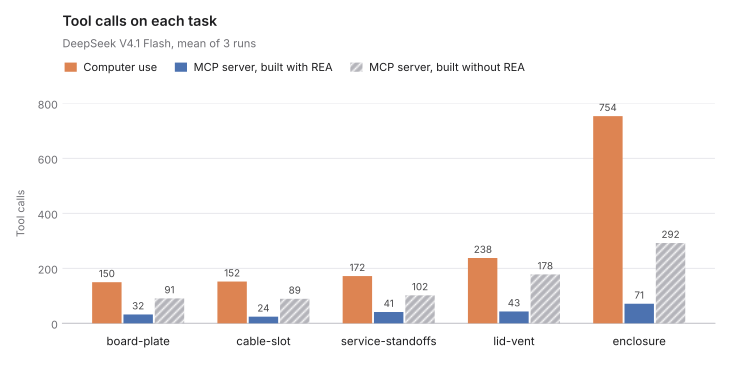
The MCP runs also needed far fewer tool calls (Figure 5): 211 for the five tasks, against 1,466 with computer use, averaged over three runs. The gap comes from what a single call does: one computer-use call is a click or a key press, while one MCP call is a whole operation, such as cutting one part out of another. Appendix C lists every call of one run, and Appendix D shows three tasks as side-by-side videos.
Without reverse-engineering tools, the server the agent builds is much less useful
To see how much the reverse-engineering tools matter, we repeat the build without REA. The agent can still run FreeCAD and use its window, but it cannot inspect the program's files or its running process. The servers it builds this way can therefore only drive menus and dialogs and read the results from the window. They passed no check beyond the starting file (Figure 3), used 752 tool calls (Figure 5) and ran close to the deadline on every task (Figure 4). Table 2 compares the two kinds of server.
Results on Fruit Ninja, a closed-source real-time game
FreeCAD is open source, even though the agent received only its binaries, and its tasks have no time pressure. To test a closed-source program that runs in real time, we use Fruit Ninja, where fruit falls off the screen while the model is still thinking. Kimi K3 builds an MCP server from the game's binary and REA in the same four steps, and then plays three 60-second rounds with the server and three with computer use.
With its server, the model averaged 304.7 points per round, against 67.7 with computer use (Figure 6), where it struggled to make meaningful moves. The computer-use score overstates how well the model played, because most of it is a bonus that the game adds when a round ends, not points from slashing fruit. In the round shown in Demo 2, the model earned 9 points in play with computer use and 202 with its server (Figure 7).
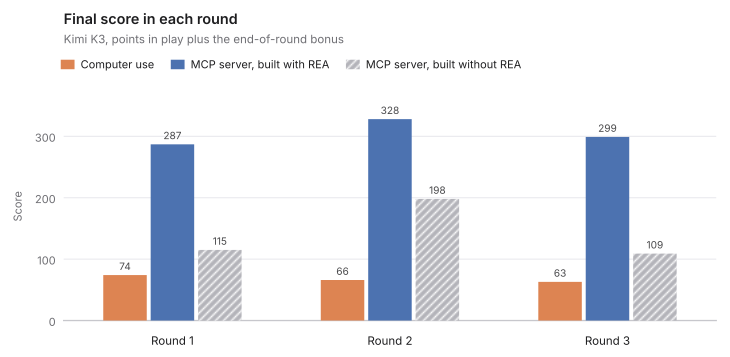
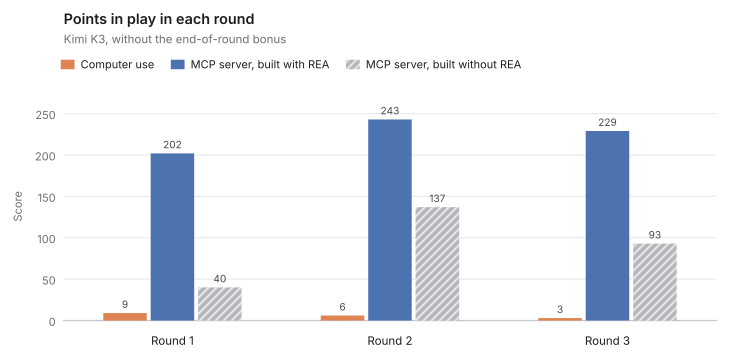
Figures 6 and 7 also show a server that the agent built without REA. This server averaged 140.7 points per round, about twice the computer-use score and less than half the score of the server built with REA.
The model does not make each slash with a separate call. The server's auto_play tool reads the fruit positions from the game process many times per second and slashes by itself, so the model played each round with one to three calls (Appendix B).
Discussion
What the reverse-engineering tools add
With REA, the agent gets inside the program. In FreeCAD, it found the functions of the embedded Python interpreter among the exports of libpython3.11, injected a script with Frida, and ran FreeCAD's own Python API from that script on the program's main thread. Each tool therefore asks FreeCAD directly for its objects and calls FreeCAD's own functions. In Fruit Ninja, the agent found where the game keeps its fruit and bombs in memory, so the server reads their exact positions and velocities many times per second and slashes from those numbers. A server built without REA offers similar tools but has to work through the window (Table 2).
| Server built with REA | Server built without REA | |
|---|---|---|
| FreeCAD, reading state | Asks the running FreeCAD for its objects and their properties. | Takes screenshots and reads the model tree and the property panel with OCR. |
| FreeCAD, acting | Calls FreeCAD's own functions inside the process. | Clicks through menus and fills in dialogs. |
| Fruit Ninja, reading state | Reads the exact position and velocity of every fruit and bomb from the game's memory. | Captures the screen at 30 frames per second, finds the fruit in the image, and tracks each fruit over at least three frames. |
| Fruit Ninja, acting | Slashes in a loop that runs many times per second. | Makes simulated mouse strokes of 200 ms each. |
Without REA, the FreeCAD server had to read the window, and this was not reliable enough. In one run it misread the names in the model tree and could not find the object it was asked to change, and in another it could not switch workbenches. The model never sees the screen itself, so it could not work around these errors and did worse than computer use. Fruit Ninja tolerates such errors better, because a missed fruit costs only a few points, so there we can separate two effects of building a server. Moving the real-time decisions from the model into the server, which the server built without REA also does, raised the points in play from 6 to 90 on average, and reading the game's state from memory instead of the window raised them from 90 to 225 (Figure 7).
Tool calls and screenshots
Screenshots are expensive for a model: on lid-vent, computer use spent 22.2M tokens and the MCP run 0.64M. But using software does not have to go through vision. An experienced FreeCAD user who wants to cut a vent into a lid knows the operations before looking at anything (make a box, place it, subtract it from the lid), and knows which tool to use before opening the menu that shows it. The screen is only how they get to the tool. A tool call skips that part: freecad_create_object(type=Part::Box, name=Vent1, properties={Length: 40 mm, Width: 3 mm, Height: 7 mm, ...}) names the operation directly.
Earlier work found a smaller gain: in OSWorld-MCP, adding MCP tools raised Claude 4 Sonnet's success rate from 40.1% to 43.3% (Jia et al., 2025). There the tools are given, so when a task needs something that they do not cover, the agent can only go back to the screen. Here the agent builds the server itself and decides which operations it offers.
Next: the agent keeps reshaping its link to the environment
In our experiments, the agent builds the server once, before it sees any task. The next step is to let it keep changing the server while it works (Figure 8). When a task is awkward with the current tools, the agent can go back to the binary, test how that part of the program behaves, and add a tool, redesign one, or combine several steps into one, as it already did with auto_play in Fruit Ninja. The link then evolves with the tasks, and a server built this way can also be shared with other agents.
If this works, a program does not need to ship an agent interface for agents to use it well. Software is one kind of environment. We are excited about agents that shape their own links to the environments they work in, starting with the software on a computer.
Contributors
Zijian Zhou, Han Zheng, Mugeng Liu, Rongjie Huang, Bo Liu, Mingruo Qu, Hanfei Yu
Appendix
A. What the agent does during a build
One FreeCAD build took 37 minutes and 203 tool calls (Figure A1). About two fifths of these calls tested the program. Writing the server took 70 calls and about 6 minutes. For example, early in the build FreeCAD crashed when the agent called its functions from an injected thread, and the agent changed the server to run every call on FreeCAD's main thread.
minutes into the build
B. The MCP servers that the agents built
The servers that the agents built, with and without REA, and the builders that produced them are in the code repository.
FreeCAD: 85 tools that call the program's own functions
The FreeCAD server has 85 tools. Each tool calls FreeCAD's own functions inside the running program, for example to save a document or export a STEP file. Figure 2 shows the path of one call.
Fruit Ninja: five tools, and one of them plays the round
The Fruit Ninja server built with REA has five tools (Figure A2). Its get_state tool reads the score and the fruit and bombs from the game process. Its auto_play tool plays for a given number of seconds. It reads the positions of the fruit many times per second and performs the slashes. The model does not need to find the fruit in an image.
One of the five tools plays the round by itself
get_stateMode, score, fruit and bombs, read from the game process.
auto_playPlays by itself for a given number of seconds.
slashOne straight slash between two points.
start_modeStarts a round from the menus.
restart_roundStarts the same mode again after a round ends.
C. Every tool call in one run
This is the run shown in Demo 1. The model sent the 46 calls in 18 replies, because one reply can contain several calls. On the same task with computer use, the model made 265 calls in 40 minutes and passed 7 of the 13 checks. Table A1 lists the 46 calls, which took 44 seconds.
| Calls | Tools | What the calls do |
|---|---|---|
| 1–3 | freecad_status freecad_list_documents freecad_list_objects | Find the open document and list its 10 objects. |
| 4–13 | freecad_get_object ×10 | Read the lid, the four screw holes, the four existing cuts and the gasket reference. |
| 14–18 | freecad_set_properties ×5 | Resize the lid to 120 × 80 × 3 mm. Set the radius and position of the four screw holes. |
| 19–23 | freecad_create_object ×5 | Create the five vent boxes, each 40 × 3 × 7 mm. |
| 24–28 | freecad_part_boolean ×5 | Cut the vents out of the lid one after another, from Vented1 to Vented5. |
| 29–30 | freecad_recompute freecad_get_object | Recompute the document and read the existing cut named Lid again. |
| 31–33 | freecad_save_document freecad_export_objects ×2 | Save the project. Export Vented5 to STEP and STL. |
| 34–38 | freecad_set_view_property freecad_activate_view freecad_view_action ×2 freecad_save_view_image | Show the final lid in the 3D view and save an image of it. |
| 39–40 | freecad_get_computed freecad_list_sub_elements | Read the volume of the final lid and count its faces, edges and vertices. |
| 41–46 | freecad_get_object ×4 freecad_list_documents freecad_get_report_view | Read back two vents, the last cut and the gasket reference. Confirm that the document is saved and that FreeCAD's report view is empty. |
D. Three tasks side by side
Figure A3 shows three of the five FreeCAD tasks, with the computer-use run and the MCP run on one clock. The lid-vent video is the one in Demo 1.
Three of the five tasks, with the two runs shown side by side
E. How this relates to prior work
Earlier work shows that agents do better with APIs or MCP tools than with only the screen, on the web (Song et al.) and on the desktop (OSWorld-MCP). We ask a different question: where do the tools come from when nobody has written them? Table A2 places this post next to earlier answers.
Language models can already help to decompile binaries (LLM4Decompile). We do not know of earlier work where the agent turns this analysis into a tool server and then does a user's tasks through the server.